Best Laptop for Small Business UK
A ThinkPad E14 Gen 7 for most Windows firms, a MacBook Air M5 if you already use Mac software, and a renewed ThinkPad T14 when the budget is tight.

The best laptop for small business use in the UK is the Lenovo ThinkPad E14 Gen 7 for most firms running Windows software. With Windows 11 Pro, 16GB of RAM and a 512GB SSD, it offers a full keyboard with a number pad, a wired network port and the business features IT support expects. If your business already uses Mac software, the MacBook Air 13-inch M5 is the better fit. For a new starter on a tight budget, a renewed ThinkPad T14 makes sense.
This guide uses Compare Electronic's business laptop guide, DashLink's small business laptop picks, PCMag UK's business laptop list, GOV.UK guidance on capital allowances and Amazon UK listings. Battery figures are maker claims. We have not tested these laptops ourselves.
Quick picks
We may earn a commission if you buy through links on this page. It never changes our verdicts. How we review.
- Best all-round Windows: Lenovo ThinkPad E14 Gen 7 (Ryzen 7 250, 16GB, 512GB, Windows 11 Pro)
Check price on Amazon - Best Mac: Apple MacBook Air 13-inch M5 (16GB, 512GB)
Check price on Amazon - Best premium Windows: Dell Pro 14 (Core Ultra 7 265U, 16GB, 512GB, Windows 11 Pro)
- Best screen: ASUS Zenbook 14 OLED (Ryzen AI 7 350, 16GB, 1TB)
- Best renewed option: Lenovo ThinkPad T14 Gen 1 Renewed (16GB, 512GB, UK keyboard)
Job-to-laptop table
Start with the work each laptop needs to handle, rather than the brand. Pay more for features that matter to the job and avoid spending extra on those that will go unused.
| Job | Minimum spec | Pick | Why |
|---|---|---|---|
| Admin and accounts | 16GB RAM, 512GB SSD, Windows 11 Pro, number pad | ThinkPad E14 Gen 7 | Full keyboard, wired network port, runs Windows accounting software |
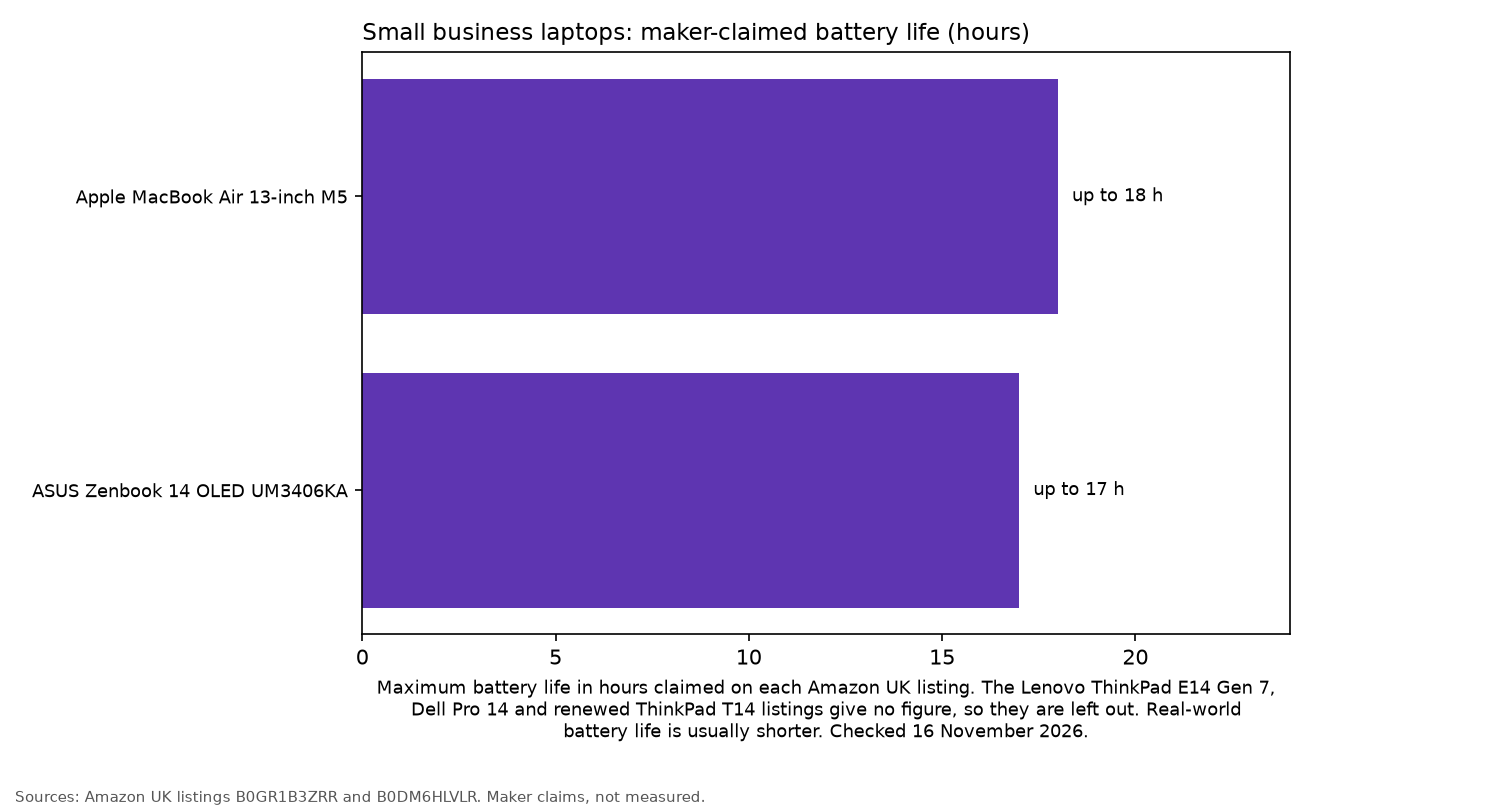
| Field and mobile work | 16GB RAM, long battery, light body | MacBook Air M5 or Zenbook 14 OLED | Maker-claimed battery of up to 18 hours on the MacBook Air, or 17 hours on the Zenbook |
| Design and photos | 16GB RAM, a strong screen | Zenbook 14 OLED or MacBook Air M5 | OLED or Liquid Retina screen. The Zenbook has a 1TB SSD. Choose the Mac if your apps are Mac apps |
| Sales and travel | 16GB RAM, Windows 11 Pro, solid build | Dell Pro 14 | Business line with Windows 11 Pro and Wi-Fi 6E |
| Buying for 2 to 5 staff | Same model for everyone | ThinkPad E14 Gen 7 or renewed T14 | One model to support, one set of chargers and spares |
Five-year cost logic. Compare Electronic estimates five-year ownership by adding warranty cover and a battery replacement to the purchase price, then spreading that total over five years. That helps explain why it rates repairable business laptops highly. Its figures are its own. A simple version of the same idea is to add the purchase price to likely battery and repair costs, then divide by the number of years you expect to keep the laptop.
Windows-only software check. Before ordering a Mac, make a list of every program your business relies on. Sage's system requirements say Sage 50 Accounts must be installed on Windows. Check the same thing for QuickBooks Desktop, trade estimating tools, practice-management systems and bank card readers. If a program you rely on has no web or Mac version, choose a Windows laptop.
What matters
Windows 11 Pro, not Home. Pro includes BitLocker drive encryption, Remote Desktop hosting and simpler access to a company directory. All the Windows laptops recommended here come with Windows 11 Pro, apart from the Zenbook. The listing title says Windows 11, and a product-details field says Windows 11 Home, so check the edition before buying.
16GB of RAM. Running a browser, Teams and accounting software at the same time can quickly use up 8GB. Each of the five laptops here has 16GB.
Repairs and warranty. Compare Electronic notes that Lenovo, HP and Dell business ranges can be sold with extended warranty cover. Register the warranty as soon as the laptop arrives. For a machine that handles payroll, an extended warranty or on-site support plan may be worth considering.
Ports. USB-A and wired network connections remain useful in offices. The ThinkPad E14 listing includes an RJ-45 Ethernet port. The MacBook Air listing has Thunderbolt and MagSafe ports, so a wired network or a USB-A accessory needs an adapter.
Security. Check for a fingerprint reader or facial recognition login, along with a TPM chip. Microsoft's Windows 11 specifications require TPM 2.0.
The picks
Lenovo ThinkPad E14 Gen 7
The ThinkPad E14 Gen 7 listing includes an AMD Ryzen 7 250 processor with 8 cores, 16GB of DDR5 RAM and a 512GB SSD. It has a 14-inch 1920 x 1200 display, Wi-Fi 6E, RJ-45 Ethernet and Windows 11 Pro. The listing also describes a backlit, spill-resistant keyboard with a number pad.
Compare Electronic rates the newer ThinkPad T14 Gen 5 highly for repairability. The E series sits in ThinkPad's more affordable range, below that T series.
Who it's for: offices running Windows software, bookkeepers and anyone who types numbers all day. Who it isn't for: people who need the lightest machine or a Mac-only app.
Check price on AmazonApple MacBook Air 13-inch M5
The MacBook Air 13-inch M5 comes with Apple's M5 chip, 16GB of unified memory and a 512GB SSD. According to the listing, it also has a 13.6-inch Liquid Retina display, Wi-Fi 7, Touch ID and up to 18 hours of battery life. The same listing's technical details split that claim into up to 18 hours of video streaming and up to 15 hours of wireless web. Those figures are maker claims.
The listing says this configuration comes with a USB-C to MagSafe 3 cable and does not include a power adapter, so check you have a USB-C charger of at least 30W. Compare Electronic describes the design as silent and fanless, and the listing calls the machine portable.
Who it's for: businesses already on Mac apps, creative work, people on the road. Who it isn't for: anyone who needs Sage 50 Accounts or other Windows-only tools.
Check price on AmazonDell Pro 14
The Dell Pro 14 is part of Dell's business laptop range. The listed configuration has an Intel Core Ultra 7 265U processor, 16GB of DDR5 RAM, a 512GB SSD and a 14-inch 1920 x 1200 display. The listing also includes Wi-Fi 6E, Windows 11 Pro and a UK English configuration. The listing does not state a battery-life figure.
Who it's for: firms that standardise on Dell or want a business-grade Intel machine. Who it isn't for: buyers after the best screen for the money.
Check price on AmazonASUS Zenbook 14 OLED
The main attraction here is the screen. The listing title describes a 14-inch 3K 120Hz OLED, and the product details give the resolution as 2880 x 1800. The Zenbook also has an AMD Ryzen AI 7 350 processor, 16GB of RAM and a 1TB SSD. The listing title claims 17 hours of battery life. That is a maker claim, and the chart shows it as up to 17 hours.
As this is a consumer laptop rather than a dedicated business model, check which Windows edition is included and read the warranty terms before ordering. The title says Windows 11, and a product-details field says Windows 11 Home, so do not assume Pro.
Who it's for: owners who do photos, design or long days away from a socket. Who it isn't for: offices that need Windows 11 Pro out of the box or a wired network port.
Check price on AmazonLenovo ThinkPad T14 Gen 1 (Renewed)
This renewed ThinkPad T14 Gen 1 comes with an Intel Core i5-10310U processor, 16GB of RAM, a 512GB SSD and Windows 11 Pro. The listing also specifies a UK keyboard layout.
It is several years older than the other laptops here, so expect shorter battery life. Check the renewed warranty terms in the listing before committing to a purchase.
Who it's for: a new starter, a spare machine or a tight budget. Who it isn't for: heavy multitasking or anyone who needs a long manufacturer warranty.
Check price on AmazonBuying tips for 2 to 5 staff
- Choose the same laptop model for everyone. That means one type of charger, the same drivers and a consistent support routine.
- Register each warranty and keep all the serial numbers together in a single spreadsheet.
- Enable BitLocker on Windows laptops or FileVault on Macs from day one.
- Arrange backups before handing the laptop over to a member of staff.
- Speak to your accountant about the Annual Investment Allowance. GOV.UK explains how equipment such as laptops can usually be deducted from profits, although the rules depend on your business.
Setting up the rest of the office? There are also guides to choosing a wireless headset for office calls, a card machine for small business, a cash register for small business and a CCTV system for small business.
FAQ
Which laptop is best for a small business?
For most offices using Windows, the ThinkPad E14 Gen 7 is a good choice, with Windows 11 Pro and 16GB of RAM. If the business runs on Mac software, choose the MacBook Air M5.
Is a refurbished business laptop worth it?
Often, yes, particularly for lighter office tasks. Business laptops such as the ThinkPad T14 are designed to last. Just check the battery health and warranty details on the listing before buying.
Windows 11 Home or Pro for business?
Windows 11 Pro is the better choice. It includes BitLocker encryption, Remote Desktop hosting and tools for managing business devices.
How much RAM does a small business laptop need?
16GB is a sensible minimum in 2026. With a browser, Teams and accounting software running together, 8GB can fill up quickly.
Can I claim a laptop as a business expense?
Usually, through capital allowances such as the Annual Investment Allowance. Check the guidance on GOV.UK and speak to your accountant about the rules for your business.
As an Amazon Associate I earn from qualifying purchases.
More from mbusinessdaily: Business · How we review
Keep reading
- Run the Business Best Wireless Headset for Office Calls in the UK
- Run the Business Best Card Machine for Small Business UK: Fees and Readers Compared
- Run the Business Best Cash Register for a Small UK Business: Tills vs POS
- Run the Business Best CCTV System for Small Business UK